


|
DRIGUS 8.12
|
The latest release of the DRIGUS software will be available soon: with version 8.12, we offer you additional features to make
your work more effective and your results even more compelling. We would be happy to present our products and the latest developments to you online. Please arrange an appointment on short notice via email or telephone. |
|
Time study analysis with a new look
The analysis feature in MEZA has been completely overhauled, featuring numerous new graphics, improved clarity, and new functions.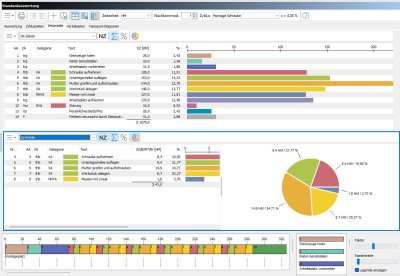 Whether it is key performance indicators, analyses of time types and allowance times, or cycle overviews—all information is immediately available. And this naturally applies to the multiple analysis functions as well. |
Everything at a glance
The Yamazumi chart provides an at-a-glance view of the value-adding nature of your recorded processes. In the master data, each time type can be
flexibly linked to a Yamazumi category—for instance, to determine whether it is classified as value-adding, necessary, or simply a form of waste.
The categories themselves are also freely definable, allowing for limitless possibilities in your analysis.
Use the Yamazumi chart for multi-station studies as well, to quickly and easily compare different workstations. 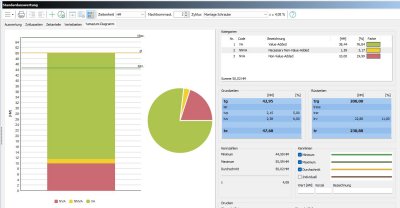 |
|
|
Perfect overview in every situation
Greater flexibility during time studies: while using the MULTIDATA you can now choose between list and tile views.
For cyclical time studies, displaying all epsilon values in the list is perfect: this way, you always have all the important data in view. And a special highlight for multi-station studies: the new list of workstations alongside their respective selected activities. This makes it easy to manage the simultaneous recording of multiple workstations without stress.  |
Best documentation with media data
Embedding photos and videos at every level of the time study has long been standard practice in MEZA. But now, you can also quickly
and easily insert any type of data into your time study using copy-and-paste: screenshots, text and tabular data, PDF files, and more —
all with a single mouse click.
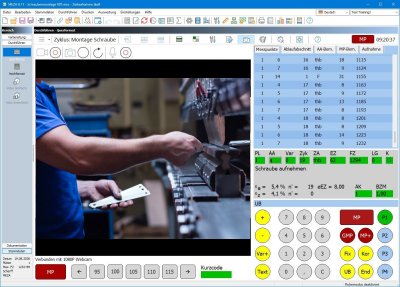 Video and audio recordings during time studies? No problem. With MEZA, you can record videos during the time study, capture additional comments via audio, and play them back directly in MEZA. Conducting time studies with MEZA leaves nothing to be desired. |
|
|
Protecting sensitive data
Are you working with data in DRIGUS that requires special protection? Version 8.12 allows you to mark any data fields as privacy-sensitive.
These fields are then visible and editable only to authorized users.
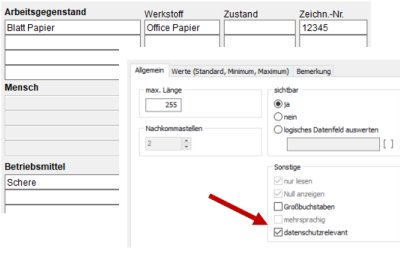 In the user rights settings, you can specify with a single mouse click whether or not the contents of data-sensitive fields are displayed — and this applies, of course, to both the screen and printouts. |
From Planning to Line Balancing
Do you want to optimize the timing of the work plan you created in PLAZET or do you want to better align the operations with the production cadence? Then use the new import function in TAKTOS, which allows you to generate takt sequences from work plans. The work plan is imported complete with operations and process stages, giving you an instant overview of the timing of your operations. You can now use drag-and-drop to move tasks from one station to another to achieve an optimal result. 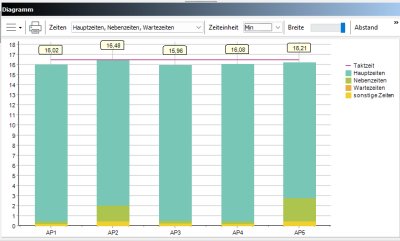 |
Are you already a customer? You will soon be able to request a no-obligation update offer here. And, of course, we will keep you informed via our newsletter.
You don't receive a newsletter yet? Click here to register.
For our maintenance customers: Your download area is automatically updated with the latest versions.
You don't receive a newsletter yet? Click here to register.
For our maintenance customers: Your download area is automatically updated with the latest versions.